Put it on the board.
The agents ship it.
TaskTrooper is a software team you hire, not a tool you operate. It works in the repository and stack you already have: it plans the tickets, builds them, tests them, deploys them and keeps production running. Your job is to accept or reject the result.
- Your repo, your stack
- Web, backend, mobile, data and games
- Tested before you see it
- Deployed and watched
- You only accept or reject
Working with TaskTrooper
Like hiring a squad. Without the hiring.
You do not buy another tool for your engineers to learn. You hand work to a team that plans it, builds it, ships it and answers for it in production.
Your backlog is the brief.
No prompt box. Connect Jira or GitHub Issues, or write what you need in plain words. The team reads your repository, turns the tickets into a sprint with estimates, and asks before it guesses.
- Works in the repository and stack you already have
- Web, backend, mobile, data and games, in one plan
- Status and comments written back to your tracker
- ACME-412Export invoices as CSVSWeek 1
- ACME-398Idempotency-Key on POST /v1/invoicesMWeek 1
- ACME-371Push notification when a payment failsMWeek 2
- ACME-355Fix: Android crash on the receipt screenSWeek 1
Each ticket gets scope, acceptance criteria and an estimate before any work starts.
It reports like a team, not a chat.
Once a week you hear what shipped, what is deployed and where a decision is yours to make, with a link to a demo of the work. Between updates you do not have to ask.
- What shipped, what is in progress, what is blocked
- Questions that need you, gathered in one place
- A demo link every week
- CSV export for invoices · live in production
- Android receipt crash fixed · 1.8.3 in review at Google Play
Idempotency keys on invoices · in QA, ready for you on Thursday
Failed-payment push: send it right away, or batch it into a daily summary?
You get features, not pull requests.
Every ticket comes back tested against its acceptance criteria, with a preview you can click through. You accept it or send it back with a note. Reading code is optional: the repository stays yours if you want to look.
- A separate QA agent runs it before you see it
- Send-backs teach the team, so the same miss does not repeat
- Accepted work is merged and deployed for you
- Export button on the invoices list
- File opens in Excel with the right currency format
- Works for 10,000+ invoices
Production is our job too.
The team does not stop at the merge. Every deploy is checked against errors and smoke tests, and alerts from your monitoring reach the team. When something breaks, it is rolled back, fixed and explained in a short report.
- Smoke checks and an error budget on every deploy
- Automatic rollback when a release goes red
- Alerts from Sentry, Alertmanager or any webhook
- 03:12Checkout error rate up from 0.2% to 4.1%
- 03:14Traced to the 02:50 release: null tax region for EU guests
- 03:16Rolled back to the previous revision · errors back to 0.2%
- 03:41Fix shipped with a test for EU guest checkout · watched 30 min
In your inbox before your first coffee. Nobody on your side was paged.
Not an app builder
Lovable builds you an app. TaskTrooper becomes your app's team.
App builders are great for a first version. Most companies are past that: they have users, a codebase and more tickets than people. That is the work TaskTrooper takes on.
| Dimension | Lovable, Bolt, v0 | TaskTrooper |
|---|---|---|
| Built for | A person with an idea, often a non-technical founder | A company with a backlog and a product already running |
| What it does | Builds a prototype or MVP from scratch | Develops and runs the product you already have |
| Codebase | Its own stack, usually a fresh project | Your existing repository and stack |
| Scope | Build | Build, test, deploy, monitor and fix |
| Platforms | Mostly web | Web, backend, mobile, data science and games |
| When it breaks | You deal with it | The team notices, rolls back and fixes it |
| Your role | The developer who keeps prompting | The product owner who accepts or rejects |
Engineering agents such as Devin or Factory are closer, but they sell a tool to your engineers. TaskTrooper sells the outcome: the ticket done, shipped and running. All comparisons →
How work flows
Two decisions stay yours. The rest is the team's.
The product manager turns every ticket into tasks the team can act on and brings the result back to you. In between, the board hands each card to the agent that owns its column. You approve the plan and the outcome; nobody relays context by hand.
- YouRequest
- PMPlans
- AnalysisArchitect
- Plan OKYou approve
- DesignDesigner
- BuildCode + PR
- ReviewArchitect + security
- QATests
- PM checkUAT
- Sign-offYou approve
- DeployRelease
1Your ticket becomes a plan
Bring a ticket from Jira or GitHub, or describe what you want. The product-manager agent reads the repository, writes the task with its assumptions, scope and acceptance criteria, and assigns it. It waits in the backlog until you approve it; then the agent picks it up.
create_board_task title="Idempotency-Key on POST /v1/invoices" assignee=backend-developer
2Unclear? An analysis first, and you approve the plan
When the technical path is not obvious, the architect writes an analysis report. Comment on any passage, answer its open questions and send everything back in one go; nothing is built until you approve the plan. A screen nobody has designed goes to the designer first, on the project's design system.
analiz_review → plan approved → design D-4 approved → 3 tasks created · blocked_by enforced
3The right developer builds, two reviewers must approve
Backend, frontend, mobile, data or game: the repository decides who builds. The developer checks out the task branch in its own workspace and starts a headless session with its prompt, skills and a per-run MCP token. In code review the architect and the security reviewer both read the PR, and the card moves on only when both approve. QA runs the build for real, the PM checks the result.
commit_task_changes → PR #31 → code_review (architect ✓ · security ✓) → in_qa → pm_uat
4Your sign-off, then the release engineer ships it
After you accept the result, the release engineer merges the PR, deploys it the way the component ships, runs smoke checks and reads production errors before it calls the task released. A red check rolls it back.
done (merge) → deploy (GitHub Actions) → smoke 6/6 · 0 new errors → released
Features
What happens to every ticket
Plan, implement, review, test, merge, deploy, verify. Each step has an owner, and the owner is an agent with its own tools, rules and checks.
The board drives, not you
A card entering a column is dispatched to that column's agent. It does the work and hands the card to the next column, where the next agent takes over. Nobody presses run, and nobody relays context by hand.
- Thirteen columns out of the box, all configurable
- Blockers park a card until they land
- A usage limit parks the task and resumes the same session
QA that has to run something
The QA agent cannot pass a task without executing: a local boot, real requests, headless-browser screenshots, iOS and Android simulators. A written plan is not a verdict. It never reads the code, so it tests what the user would see.
- Acceptance criteria are the checklist; every one needs a verdict
- A separate agent from the one that wrote the code
- Failed runs re-dispatch, bounded
- run_terminalnpm run dev · :3200 up
- browser_screenshotsettings → limits · 1440×900
- set_test_case_resultTC-3 rate limit header · pass
- review_criterion3/3 criteria approved
A run with a plan and no execution is failed and re-dispatched.
Signed off, shipped, verified, or rolled back
Every task gets its own branch and pull request. After your sign-off the release engineer merges it and ships it the way that component ships: a GitHub Actions deploy on merge, a dispatched workflow, Vercel, or a batched, versioned release for desktop and mobile apps. It reads production logs and errors before it calls the task released.
- A delivery profile per component: on merge, dispatch or batch
- Smoke checks, a soak window and a new-errors budget on every deploy
- Rollback through the provider: Vercel promote, Cloud Run traffic
- sign-offyou accepted the result
- mergePR #31 · squash → main
- deployGitHub Actions · Cloud Run · prod
- verifysmoke 6/6 · 0 new errors · soak 10m
- releasedT-24 · acme-api
It knows the system it is changing
A project groups your repositories, and each repository is split into components with their stack, commands, checks, environments and cloud resources. A scanner fills it in, you confirm or override it, and every agent reads the brief before it touches code. The architecture map shows how the pieces fit.
- Single services, monorepos and multi-repo projects
- Detected facts are confirmed or overridden, never silently changed
- Runtime logs and errors from Cloud Run, Vercel and AWS reach the agents
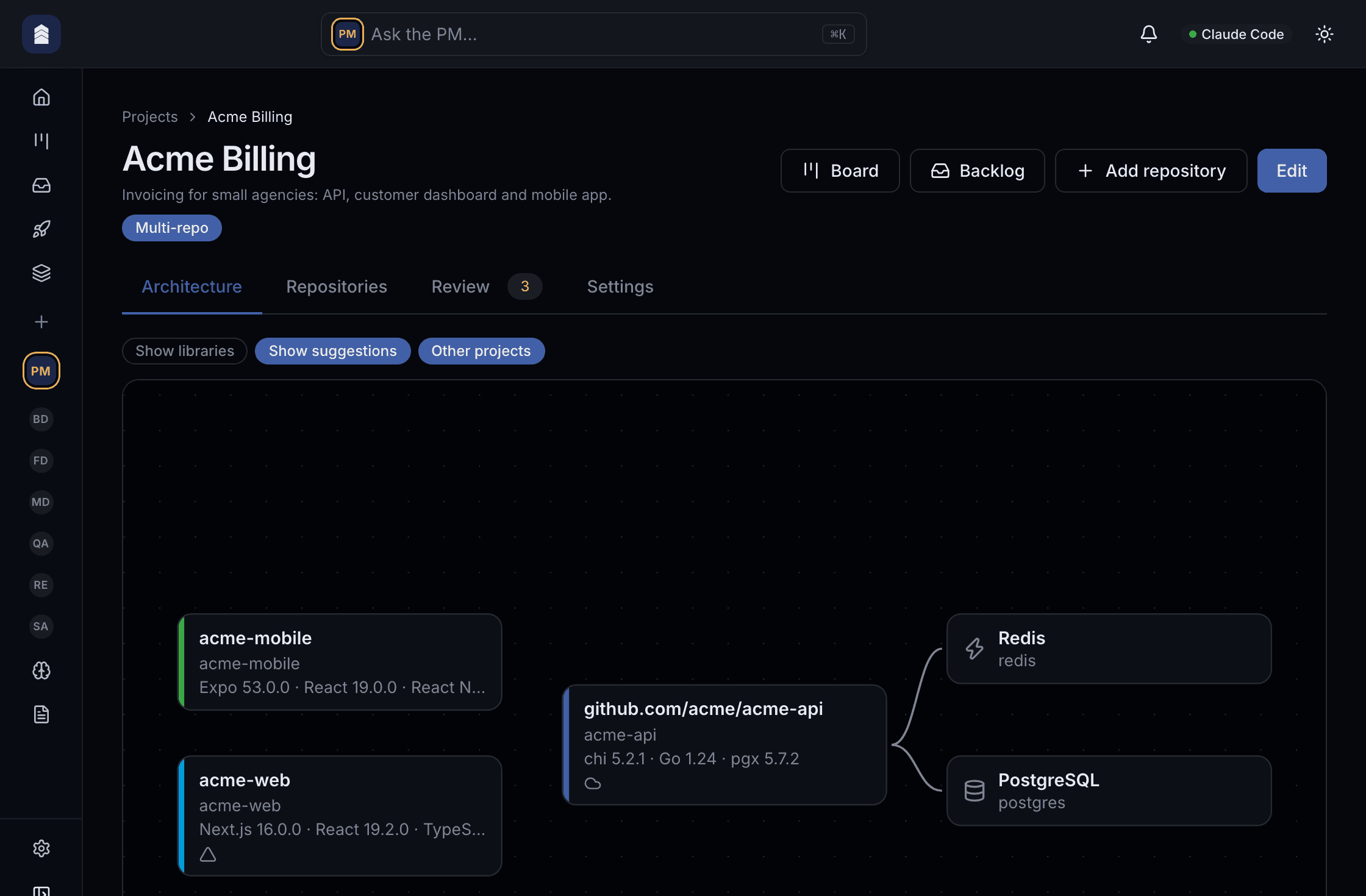
Analysis you can mark up
The architect writes an HTML report. Comment on any passage, answer its open questions and send it all back in one go.
A preview for every PR
Vercel preview deployments per pull request, opened straight from the box where you accept the result.
Self-evolving playbooks
Agents review their own runs, scores and KPIs and propose changes to their skills and rules. A golden suite and a judge decide whether the change stays.
Memory in four scopes
Personal or team-wide, per repository or across all. Near-duplicates are refused.
Code understanding, locally
Repositories parsed with tree-sitter and embedded on your machine, so agents search semantically and see uncommitted edits.
Enforced ordering
blocked_by, deploy_depends_on, derived_from, discovered_from are relations the runtime acts on, not prose.
Your agents, your runtimes
Create agents from a template or from scratch. Each one picks its own runtime: Claude Code, Cursor, Antigravity or OpenCode as a local process, or Anthropic, OpenAI, Gemini, Groq or any OpenAI-compatible API.
Every token accounted for
Tokens per model and per day, agent CLI sessions and direct API calls alike, with the share served from the prompt cache.
Nothing to host
The desktop app starts an embedded Postgres and the Go backend. No account, no cloud, no login.
The team
Four sessions at once, each with its own tools
Every task runs in its own workspace, on its own branch, in its own CLI session. Every role has its own tool policy. So while the game developer runs its engine's tests, the security reviewer is reading another task's diff, QA is driving a browser against a third build and the release engineer is verifying a fourth in production. They never share a session and never step on each other's files. Eleven roles ship ready to work, led by the product manager: architect, security reviewer, UI designer, backend, frontend, mobile, data and game developers, QA and release engineer. Create your own agents from a template or from scratch, and give each one the runtime it works best on.
- Tool policies per role
- Allow-lists per agent, tightened again by column: a QA verdict column cannot write code, and only the release engineer merges and deploys.
- Workspaces per task
- A clone under the data directory per task, the task branch checked out before the agent starts. Files land in the tree the runner commits.
- One board, many owners
- The card is the hand-off. When a developer moves it to Code Review, the architect's and the security reviewer's sessions start, and it moves on only when both approve; nobody relays context by hand.
- Your own agents, your own runtimes
- Add an agent from a template or from scratch: prompt, skills, rules, tool policy, columns, memory. Each agent picks its provider, so a Cursor-based reviewer and a Claude Code developer share one board.
Pricing
Free for one. Per seat for a team.
The open-source app is complete on its own. You pay when more than one person works on the same board.
Solo
The whole team of agents for one person, on your own computer. Apache-2.0, no account, nothing hosted.
- Every role agent, every column, deploy and rollback
- Runs on your machine with your own CLI or API key
- No limits on projects or tasks
Team
For teamsEveryone on one board. Each person's tasks still run on their own computer; the cloud only keeps the team in sync.
- A shared board with owner, admin and member roles
- Web, desktop and iPhone apps
- Jira and GitHub issues imported, status written back
Enterprise
Your own isolated server and database on your own domain, and agents in your cloud if you want them there.
- Dedicated deploy, separate from every other company
- Agents in your company's cloud sandbox
- Traces, metrics and logs to your own stack
Who it is for
- Teams whose backlog outgrew them
- Web, backend, mobile, data and game work: maintenance plus the features that never make the sprint.
- Agencies with more work than people
- Several client projects on one board, each in its own repositories and stack.
Guardrails built in
- You approve the plan and the result
- Nothing is built before you approve the plan, and nothing ships before you accept the result.
- Permissions per role
- Tool policies per agent and per column. Only the release engineer merges and deploys, and the deploys you choose wait for approval.
- Rollback built in
- A red smoke check or new production errors roll the release back to the last good revision.
- Code stays on your computers
- Agents run on each member's own machine with their own keys. The team cloud distributes work; it never sees your API keys.
For teams
Bring TaskTrooper to your team
Leave your details and we will get back to you by email to find a time.
- A walkthrough on a project like yours
- How each person's computer joins the shared board
- Per-seat pricing for your team size
Start free
Download TaskTrooper
Free and open source for one person, on your own machine.